Embeddings Explained — From Text to Vectors (Complete Guide)
Introduction
If you’ve ever wondered how a search engine finds results that mean the same thing even when you use different words — embeddings are the answer. They are the invisible engine behind semantic search, recommendation systems, and the retrieval step in every RAG (Retrieval-Augmented Generation) pipeline.
In this post, you’ll go from zero to a working understanding of embeddings: what they are, how they differ from traditional encoding, which models produce them, and how to use them in Python with just a few lines of code.
What you’ll learn:
- The difference between encoding and embedding — clearly explained with examples
- How vectors, scalars, and matrices relate to each other
- How embedding models convert raw text into meaningful numbers
- How cosine similarity and dot product are used to compare embeddings
- How to use sentence-transformers in Python to generate and compare embeddings
- Where embeddings fit in a RAG pipeline
Prerequisites
Before you start, make sure you have:
- [ ] Python 3.11 installed (CPython interpreter specifically — not PyPy)
- [ ]
uvpackage manager installed (used throughout this series) - [ ] Basic Python knowledge (functions, lists, loops)
- [ ] Familiarity with what a RAG pipeline is (see Post 9 in this series)
Lab Environment
| Component | Version/Details |
|---|---|
| Python | 3.11 (CPython only) |
| Package Manager | uv |
| Key Library | sentence-transformers |
| Model Used | all-MiniLM-L6-v2 (HuggingFace) |
| Hardware | Any CPU-only machine works for this demo |
Setup commands:
# List available Python versions
uv python list

# Install Python 3.11
uv python install 3.11

# Create a virtual environment
uv venv env --python 3.11

# Activate it (Linux/Mac)
source env/bin/activate

# Install dependencies
uv pip install -r requirements.txt
A minimal requirements.txt for this post:
sentence-transformers==3.0.1
numpy==1.26.4
What is the Difference Between Encoding and Embedding?
These two terms are often confused — even in professional settings. Here is the clean distinction:
| Feature | Encoding | Embedding |
|---|---|---|
| Purpose | Convert data to numbers | Convert data to numbers that represent meaning |
| Nature | Often sparse, count-based | Dense, neural network or transformer-based |
| Semantic meaning | Not preserved | Preserved |
| Context awareness | Not preserved | Preserved |
| Example techniques | One-Hot, BOW, TF-IDF, BM25, GloVe | Word2Vec, FastText, BERT, OpenAI, BGE |
Encoding is the broader term — it simply means converting raw data (text, images, etc.) into a numerical form. It does not care whether the meaning is preserved. A single word like “bank” always gets the same number regardless of whether it means a river bank or a financial institution.
Embedding is a specific kind of encoding that uses neural networks (and more recently, transformers) to produce a dense, high-dimensional vector that captures semantic context. The word “bank” in “I sat on the river bank” gets a different vector than “bank” in “I deposited money in the bank” when produced by a modern transformer-based embedding model.
Understanding Vectors — The Foundation
Before going further, you need a solid grasp of vectors.
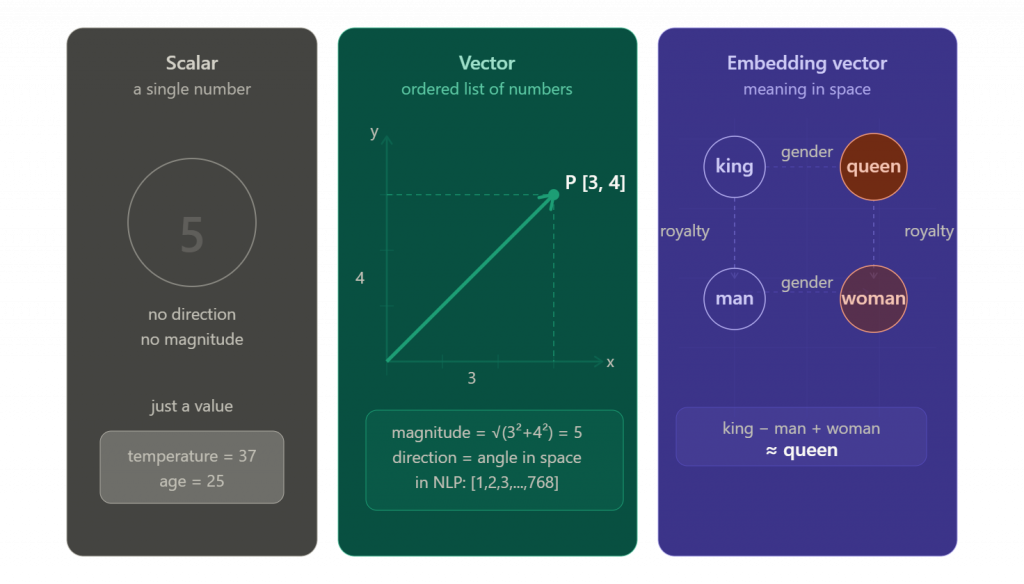
Scalar vs Vector vs Matrix
- Scalar — a single number. Example:
5 - Vector — a list of numbers. Example:
[1, 2, 3] - Matrix — a collection of vectors (a grid of numbers). Example:
[[1, 2], [3, 4]]
A vector has both magnitude (how large) and direction (where it points). This is where the analogy to physics comes in — in NLP and AI, a vector’s “direction” in high-dimensional space encodes meaning.
Scalar  →  5
Vector  →  [1, 2, 3]          (1D, 2D, 3D...)
Matrix  →  [[1, 2],            (rows × columns)
            [3, 4]]
In programming, a vector is typically stored as a Python list or a NumPy array — a collection of float values.
Dimensions
A vector’s dimensionality tells you how many numbers it contains:
| Vector | Dimensions |
|---|---|
[1] | 1D |
[2, 4] | 2D |
[3, 9, 5, 7] | 4D |
[3, 4, 6, 7, ..., n] | n-dimensional |
Modern embedding models produce very high-dimensional vectors. The OpenAI embedding model text-embedding-3-large produces vectors with 3072 dimensions. Common sizes include 384, 768, 1024, 1536, and 2048.
What is an Embedding?
An embedding is a dense, high-dimensional numerical vector that represents the semantic meaning of data.
Key properties:
- Dense — most values are non-zero (contrast with sparse encodings like One-Hot where most values are zero)
- High-dimensional — typically 100 to several thousand dimensions
- Meaningful — similar concepts end up close together in vector space
Embeddings work for more than just text. Modern embedding models can convert:
- Text (words, sentences, documents)
- Images
- Audio
- Video
All of these become vectors in the same kind of numerical space, which is why multimodal search is possible.
Traditional Encoding Techniques (Before Neural Networks)
These methods pre-date deep learning and are still used in specific scenarios, especially when neural resources aren’t available.
1. One-Hot Encoding
Assigns a unique index to each word in a vocabulary. The vector is all zeros except for a single 1 at the word’s index.
Example vocabulary: ["apple", "iphone", "fruit"]
apple  → [1, 0, 0]
iphone → [0, 1, 0]
fruit  → [0, 0, 1]
Problem: Vectors are extremely sparse, and there is zero relationship between words. “apple” and “fruit” are just as “different” as “apple” and “airplane.”
2. Bag of Words (BOW)
Represents a document as a count of how many times each word from the vocabulary appears.
Example:
- Vocabulary:
["I", "love", "India", "hate"] - Sentence: “I love India” →
[1, 1, 1, 0]
Problem: No notion of word order or meaning. “I love India” and “India love I” produce the same vector.
3. TF-IDF (Term Frequency — Inverse Document Frequency)
A smarter version of BOW. Weights words by how often they appear in a document vs how common they are across all documents. Common words like “the” get penalized; rare but meaningful words get boosted.
Still a limitation: It captures importance but not semantic meaning. “car” and “automobile” are treated as completely unrelated.
4. BM25
An improved extension of TF-IDF. Technically a ranking algorithm rather than just an encoding method. Widely used in production search engines (including Elasticsearch’s default). Still keyword-based — no semantic understanding.
5. GloVe (Global Vectors)
A hybrid approach: count-based (co-occurrence statistics) plus matrix factorization. Produces dense word vectors. A step up from BOW and TF-IDF, but still produces static embeddings — every word gets exactly one fixed vector regardless of context.
Classical Word Embeddings — Neural Network Era (2013–2020)
Word2Vec
Introduced by Google in 2013. Uses a shallow neural network trained on large text corpora to learn word associations. Famous for its ability to do word arithmetic:
king - man + woman ≈ queen
Limitation: Word2Vec produces static embeddings. The word “bank” always maps to the same vector — it cannot distinguish between “river bank” and “financial bank.”
# Static embedding — same vector for "bank" in both contexts
bank → [0.21, -0.44, 0.89, ...]   # always the same
FastText
Created by Meta (Facebook AI). An extension of Word2Vec that also considers character n-grams (subword information). Better at handling rare words and morphological variations (“running”, “runs”, “runner” are understood to be related).
Still limited: Static embeddings — no context-awareness.
Modern Embeddings — Transformer Era (State of the Art)
The transformer architecture (introduced in the 2017 paper “Attention is All You Need”) revolutionized embeddings. Models like BERT, and later sentence-transformers, OpenAI’s text-embedding models, and Anthropic’s Claude Embeddings, produce dynamic, context-aware embeddings.
# Dynamic (contextual) embedding — different vectors for the same word
# Sentence 1: "I sat on the river bank"
bank → [0.21, -0.44, 0.89, ...]

# Sentence 2: "I deposited money in the bank"
bank → [0.93, 0.01, 0.75, ...]
The two vectors are meaningfully different because the model has “read” the entire sentence.
The Text Hierarchy in NLP
When working with embeddings, it helps to understand how text is structured:
| Unit | Definition |
|---|---|
| Corpus | Collection of documents |
| Document | Collection of paragraphs |
| Paragraph | Collection of sentences |
| Sentence | Collection of words/tokens |
| Word (Token) | May be split further into subword tokens |
| Character | Smallest unit (A, B, C…) |
Transformer-based models can produce embeddings at the word, sentence, and document level.
Popular Embedding Models
Closed-Source (API-based)
| Model | Provider |
|---|---|
| text-embedding-3-small | OpenAI |
| text-embedding-3-large | OpenAI |
| text-embedding-ada-002 (legacy) | OpenAI |
| Gemini Embeddings | |
| Claude Embeddings | Anthropic |
| Cohere Embeddings | Cohere |
| Titan Text Embeddings | AWS (Amazon Bedrock) |
Open-Source (Self-hosted)
| Model | Provider | Modality |
|---|---|---|
| all-mpnet-base-v2 | HuggingFace (Sentence-Transformers) | Text |
| all-distilroberta-v1 | HuggingFace (Sentence-Transformers) | Text |
| BAAI/BGE-Base-En | BAAI | Text |
| BGE-multilingual | BAAI | Text |
| miniLM L6 | Microsoft/OpenAI | Text |
| OpenCLIP | HuggingFace (OpenAI) | Image/Vision |
| BLIP2 | Various | Image/Vision |
| Wav2Vec 2.0 | Meta | Audio |
| VideoMAE | Video |
Where to find and benchmark models:
- MTEB Leaderboard: https://huggingface.co/spaces/mteb/leaderboard
- Sentence-Transformers docs: https://www.sbert.net/
- All sentence-transformer models: https://huggingface.co/models?library=sentence-transformers
Similarity Search — How Embeddings Are Compared
Once you have embedding vectors, you need a way to measure how similar they are. Three common metrics:
1. Dot Product
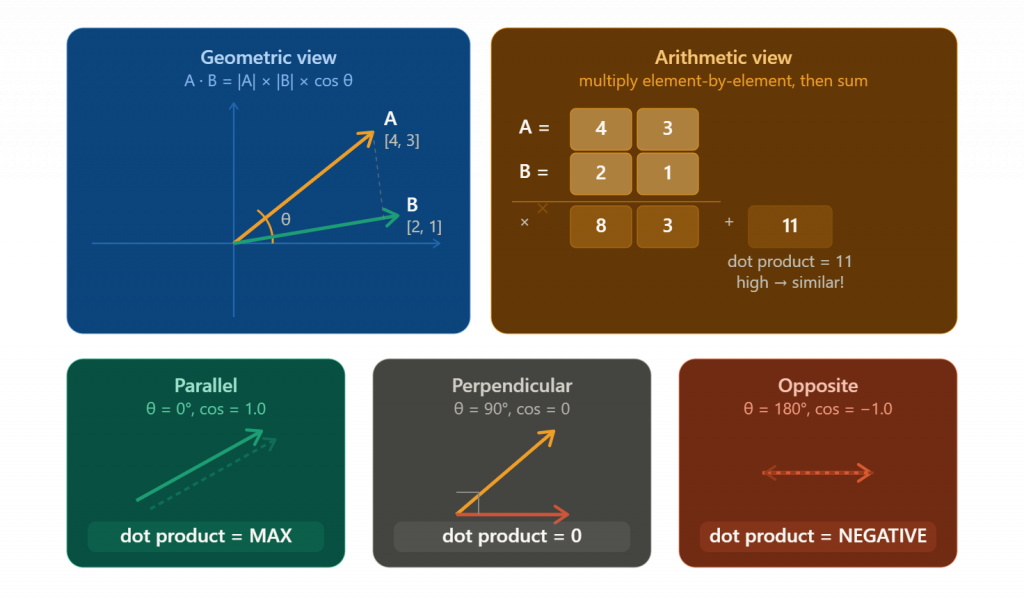
Multiply the corresponding elements of two vectors and sum them up.
Vector A = [1, 0]  (IPHONE)
Vector B = [0, 1]  (Fruit Apple)

Dot Product = (1×0) + (0×1) = 0
A dot product of 0 means the two vectors are perpendicular (90° angle) — they share no similarity. This is the mathematical proof that “iPhone” (a technology concept) and “fruit apple” (a food concept) are semantically unrelated in this simplified encoding.
2. Cosine Similarity
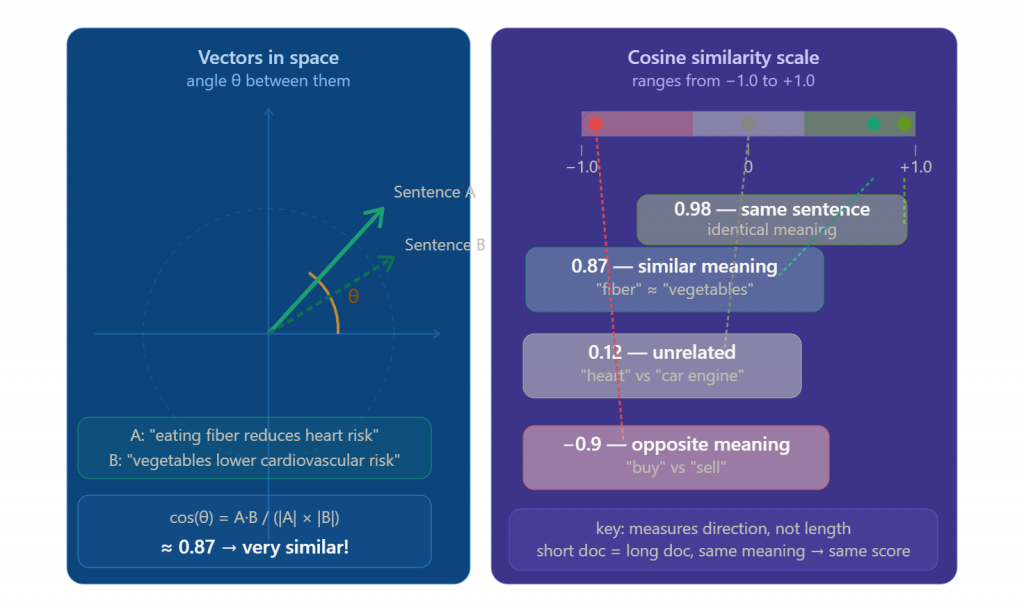
Measures the cosine of the angle between two vectors. The formula accounts for vector magnitude, making it scale-invariant.
- cos(0°) = 1.0 → identical meaning
- cos(90°) = 0.0 → completely unrelated
- cos(180°) = -1.0 → opposite meaning
Cosine similarity is the most widely used metric in semantic search and RAG systems because it focuses purely on direction (meaning), not magnitude (length of text).
3. Euclidean Distance (ED)
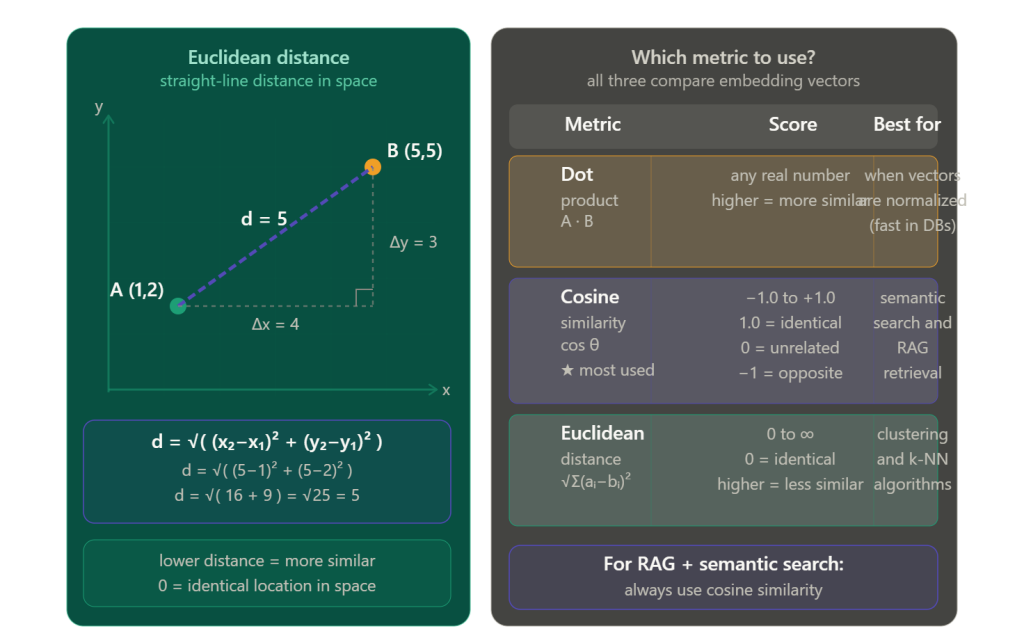
Measures the straight-line distance between two points in vector space. Lower distance = more similar. Works well but is sensitive to vector magnitude.
Hands-On: Generating Embeddings with Python
Step 1: Install sentence-transformers
uv pip install sentence-transformers

PS C:\temp\my-demo> uv pip install sentence-transformers
Resolved 40 packages in 804ms
Prepared 7 packages in 9.59s
Installed 14 packages in 4.03s
 + annotated-doc==0.0.4
 + anyio==4.13.0
 + h11==0.16.0
 + hf-xet==1.4.3
 + httpcore==1.0.9
 + httpx==0.28.1
 + huggingface-hub==1.13.0
 + pyyaml==6.0.3
 + safetensors==0.7.0
 + sentence-transformers==5.4.1
 + shellingham==1.5.4
 + tokenizers==0.22.2
 + transformers==5.7.0
 + typer==0.25.1
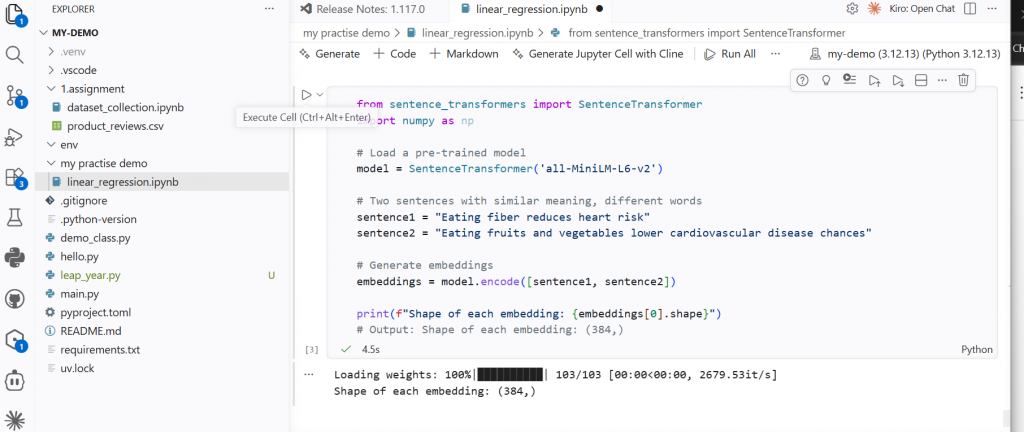
Step 2: Generate embeddings for two sentences
from sentence_transformers import SentenceTransformer
import numpy as np

# Load a pre-trained model
model = SentenceTransformer('all-MiniLM-L6-v2')

# Two sentences with similar meaning, different words
sentence1 = "Eating fiber reduces heart risk"
sentence2 = "Eating fruits and vegetables lowers cardiovascular disease chances"

# Generate embeddings
embeddings = model.encode([sentence1, sentence2])

print(f"Shape of each embedding: {embeddings[0].shape}")
# Output: Shape of each embedding: (384,)
What you’ll see: Each sentence becomes a vector of 384 float values. The model is all-MiniLM-L6-v2 — a fast, high-quality open-source sentence embedding model.
Step 3: Compute cosine similarity
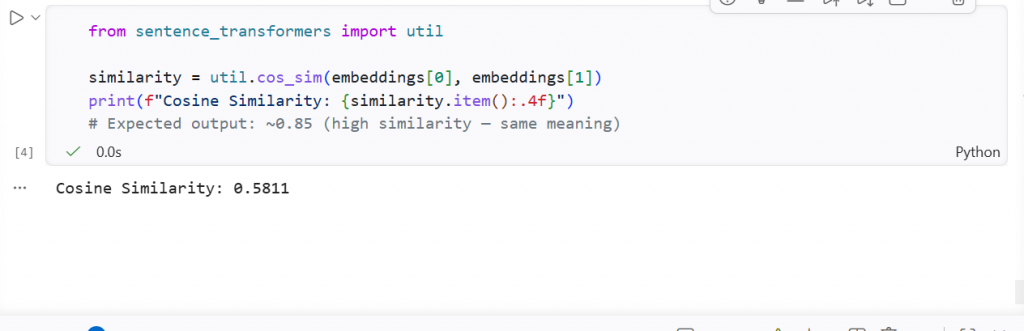
from sentence_transformers import util

similarity = util.cos_sim(embeddings[0], embeddings[1])
print(f"Cosine Similarity: {similarity.item():.4f}")
# Expected output: ~0.85 (high similarity — same meaning)
Step 4: Compare two unrelated sentences
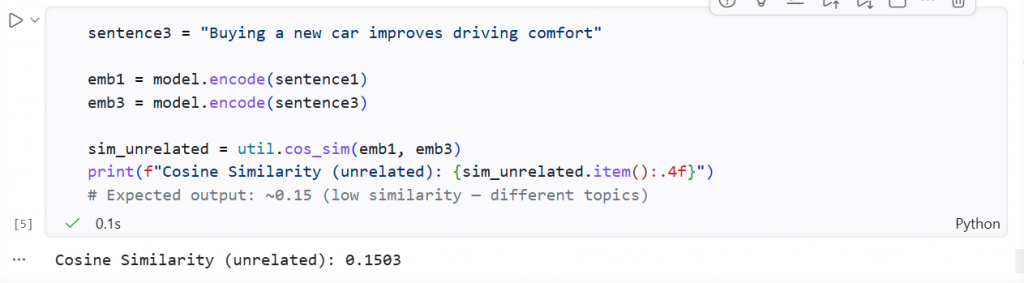
sentence3 = "Buying a new car improves driving comfort"

emb1 = model.encode(sentence1)
emb3 = model.encode(sentence3)

sim_unrelated = util.cos_sim(emb1, emb3)
print(f"Cosine Similarity (unrelated): {sim_unrelated.item():.4f}")
# Expected output: ~0.15 (low similarity — different topics)
This demonstrates exactly what makes semantic search powerful: two sentences about health are recognized as similar even though they share no keywords. A sentence about cars scores low against a health sentence.
Keyword Search vs Semantic Search
| Feature | Keyword Search | Semantic Search |
|---|---|---|
| Matching method | Exact word match | Vector similarity (cosine, dot product, Euclidean) |
| Technology | BM25, TF-IDF | Transformer-based embeddings |
| Example query | “how to reduce heart risk” | “how to reduce heart risk” |
| Would match “lower cardiovascular disease chances”? | ❌ No (different words) | ✅ Yes (same meaning) |
| Would match “quick fat loss strategies” for “how to lose weight fast”? | ❌ Weak | ✅ Strong |
The core insight: Semantic search matches meaning, not words. Two sentences can be semantically identical (“how to lose weight fast” and “quick fat loss strategies”) and keyword search will miss the connection entirely. Semantic search with embeddings catches it.
Where Embeddings Fit in a RAG Pipeline
This is Post 12 in the RAG series, and embeddings are the critical component that makes retrieval work:
User Query
    ↓
[Embedding Model] → Query Vector
    ↓
Vector Database (stores pre-computed document embeddings)
    ↓
Similarity Search (cosine / dot product / Euclidean)
    ↓
Top-K Relevant Chunks Retrieved
    ↓
[LLM] → Final Answer (grounded in retrieved context)
Without embeddings, there is no vector. Without vectors, there is no similarity search. Without similarity search, RAG collapses back to basic keyword retrieval — which is far less effective.
Applications of Embeddings
Embeddings power some of the most important systems in modern software:
- Semantic Search — the most fundamental application. Match vector similarity instead of keywords. Used in Google Search, enterprise search tools, and RAG pipelines.
- Google-like Search Engines — large-scale vector similarity at web scale.
- Google Image Search / Pinterest — image embeddings enable visual similarity search (“find images of red cars”).
- Recommendation Systems — Netflix (similar movies), Amazon (similar products), Spotify (similar songs) all use vector similarity to find what users will enjoy next.
- Topic Modeling and Clustering — group similar documents together automatically. Used in news categorization.
- RAG (Retrieval-Augmented Generation) — the backbone of grounded LLM responses. Retrieves relevant context before generating an answer.
Key Takeaways
✅ Encoding converts data to numbers; embedding converts data to numbers that preserve semantic meaning — a critical distinction.
✅ A vector is an ordered list of numbers. In NLP, an embedding is a vector where the direction in space encodes meaning. Similar concepts have similar directions.
✅ Classical methods (One-Hot, BOW, TF-IDF) are sparse and do not capture meaning. Transformer-based models produce dense, contextual embeddings that do.
✅ Cosine similarity is the most common way to measure how semantically close two embeddings are. A score near 1.0 means very similar; near 0 means unrelated.
✅ The sentence-transformers library (Python) makes it trivial to generate and compare high-quality embeddings using open-source models from HuggingFace — no API key required.
Test Your Knowledge
Ready to test what you’ve learned? Take the free quiz:
20 questions · Instant feedback · Detailed explanations · Free
What’s Next
This post is part of the Series 3: RAG series:
| # | Post | Status |
|---|---|---|
| 9 | RAG Explained — What is Retrieval Augmented Generation? | ✅ Published |
| 10 | Build Your First RAG App with LangChain — Step by Step | ✅ Published |
| 11 | Vector Databases Explained — Pinecone vs Chroma vs Weaviate | ✅ Published |
| 12 | Embeddings Explained — From Text to Vectors | 📍 You are here |
| 13 | LangChain Tutorial for Beginners — Complete Guide | ⬜ Coming next week |
References
- MTEB Leaderboard — HuggingFace
- Sentence-Transformers Official Docs
- Sentence-Transformer Models on HuggingFace
Found this helpful? Share it with your team! Questions? Drop them in the comments below.