🤖GenAI from Scratch — Post 2 of 24 | Series: GenAI Foundations
📋 Table of Contents
- Today’s blog Agenda
- The Full AI Tree — From ML to GenAI (Complete Map)
- Deep Learning Branches: ANN, CNN, RNN, GAN, Transformer
- NLP Evolution — Why RNNs Failed and Transformers Won
- The Modern Route to GenAI Engineer
- Career Path: DA → DE → DS → MLE → GenAI Eng
- The Complete GenAI Tools Ecosystem (30+ Tools)
- AI Coding Assistants: GitHub Copilot, Claude Code, OpenAI Codex
- Step-by-Step: Set Up GitHub Copilot in VS Code (Free)
- Complete UV Command Reference
- Common Errors and Fixes
- Key Takeaways
- What’s Next
In previous blog we set up our environment. Now it’s time to answer the question every DBA asks when they start this journey: “Where exactly does Generative AI fit in the AI universe? And which tools do I actually need to learn?”
In this post — we’ll map the complete AI landscape from ML all the way to Agentic AI, introduce the 30+ tools you’ll use throughout this series, and set up GitHub Copilot in VS Code so AI starts helping you write code from today.
One of our team mate— a DB developer with 9 years of experience — asked : “I come from a database background, basic Python, no ML. How do I navigate all this?” This will answer shapes this entire post.
What you’ll learn:
- The complete AI tree: ML → DL → NLP → GenAI → Agentic AI, with all branches
- Why RNNs and LSTMs are now obsolete and Transformers dominate
- The “Modern Route” — the shortcut path for DBAs jumping straight to GenAI
- 30+ tools categorized by role (foundations, RAG, agents, cloud, evaluation)
- How to set up GitHub Copilot free in VS Code — step by step with screenshots
- The full UV command reference you’ll use every class
🔬 Lab Validated: GitHub Copilot setup and all UV commands tested in VS Code 1.88+ on Windows 11 and Ubuntu 22.04.
Prerequisites
- ☑ Completed Post 1 — UV installed, VS Code set up, project folder created
- ☑ A free GitHub account — github.com
- ☑ VS Code open with your
genai-bootcampproject from Post 1
1. Today’s blog Agenda
Here’s exactly what this blog covered:
📋 Agenda — 28 March 2026
- Dashboard + Resources Walkthrough — GitHub repo, Notion notes, G-sheet calendar
- Pre-requisites — Python, Git, VS Code; ML/DL/NLP/CV (optional but helpful)
- VS Code + GitHub Copilot — Set up your AI coding assistant
- GenAI Overview — Deep dive: where GenAI lives in the AI tree
- Module 1 Preview — Encoding, Embeddings, Tokenisation (next blog)
This is the approach we’ll follow throughout this series. Understand the concept deeply, then use AI coding assistants to accelerate the implementation.
2. The Full AI Tree — From ML to GenAI (Complete Map)
                        AI (Artificial Intelligence)
                       /           |              \
                      /            |               \
              Machine           Deep              Reinforcement
              Learning         Learning             Learning
           (Statistics)    (Neural Networks)    (Q-Learning, PPO)
               |                  |
        pandas / numpy /     PyTorch / TF
        sklearn               (tools)
               |                  |
           Classification    ┌────┴─────────────────────┐
           Prediction        │                          │
           Regression      ANN/MLP    CNN    RNN    GAN    DRL
                                      │      │
                                   Vision  NLP
                                  (CV)   (Natural Lang)
                                           │
                                     LSTM / GRU
                                    (Advanced NLP)
                                           │
                                    Encoder-Decoder
                                           │
                                  ┌────────────────┐
                                  │  TRANSFORMER   │  ← 2017: Attention is All You Need
                                  └────────────────┘
                                           │
                              LLMs / SLMs / MultiModal LLMs
                                           │
                                      Fine-Tuning
                                           │
                                      RAG / mmRAG
                                           │
                                     Agentic AI
                                           │
                                        LLMOps
🗄️ DBA Analogy — The AI Tree as a Database Architecture
Think of this tree like a database technology stack. AI is the enterprise platform (like Oracle). ML is the query engine (statistics-based). Deep Learning is the advanced optimizer (neural network-based). GenAI is the intelligent automation layer on top. And Agentic AI is the autonomous DBA — the system that reads your alerts, diagnoses problems, and executes fixes by itself.
3. Deep Learning Branches: ANN, CNN, RNN, GAN, Transformer
Deep Learning is the most important sub-domain to understand because every GenAI model is built on top of Deep Learning.
| Network Type | Full Name | What it does | Used for | Status in 2026 |
|---|---|---|---|---|
| ANN / MLP | Artificial Neural Network / Multi-Layer Perceptron | The fundamental building block — layers of neurons that learn patterns | Tabular data, basic classification | ✅ Foundation — still used |
| CNN | Convolutional Neural Network | Applies filters to detect spatial features (edges, shapes, patterns) | Computer Vision — image classification, object detection | ✅ Active — images/video |
| RNN | Recurrent Neural Network | Processes sequences by passing state forward — reads text word-by-word | Time series, early NLP | ❌ Largely obsolete |
| LSTM / GRU | Long Short-Term Memory / Gated Recurrent Unit | Advanced RNNs that remember longer context — solved the “forgetting” problem of RNNs | Speech, translation, advanced NLP (2018-2019) | ❌ Replaced by Transformers |
| GAN | Generative Adversarial Network | Two networks compete: Generator creates fake data, Discriminator detects fakes. Both improve. | Image generation, deepfakes, synthetic data | ⚠️ Niche — mostly replaced |
| Transformer | Transformer (Attention is All You Need) | Processes entire sequences at once using “attention” — understands context across long distances | LLMs, GenAI, BERT, GPT, every modern AI model | ✅ Dominant — the foundation of all GenAI |
💡 Key Takeaway : For the Modern Route to GenAI, you only need a theoretical understanding of ANN, CNN, and RNN — not the code. Your practical focus starts from the Transformer onwards.
4. NLP Evolution — Why RNNs Failed and Transformers Won
The notes show a clear evolution path with RNNs and LSTMs crossed out — meaning they are now obsolete for new projects. Here’s why that happened and why it matters for DBAs:
The NLP Timeline
TEXT  ──→  must be converted to NUMBERS for ML/AI
              │
              ▼
    ENCODING / EMBEDDING  ←──────────────────── LLMs use this TODAY
    (Vector + Tokenisation)
              │
      ┌───────┴───────────┐
      │                   │
   Classical           Modern
   Approach            Approach
      │                   │
  One-hot /           Contextual
  TF-IDF             Embeddings
  (numbers only,      (meaning +
  no meaning)         context)
              │
              ▼
   Old approach tried: Encoder-Decoder Architecture
   │
   └── RNN  ──→  LSTM/GRU  (2018-2019)
       ❌ Problem: couldn't handle very long sequences
       ❌ Slow: had to process tokens one at a time
       ❌ Forgot: context was lost over long text
              │
              ▼
   2017: TRANSFORMER ──→ "Attention is All You Need"  ✅
       ✅ Processes ALL tokens simultaneously (parallel)
       ✅ Attention mechanism: focuses on relevant parts
       ✅ Scales with more data + compute
       ✅ Led to: BERT → GPT → ChatGPT → Claude → Gemini
🗄️ DBA Analogy — RNN vs Transformer = Full Table Scan vs Index
An RNN reads text like a full table scan — it processes records one by one, left to right, and by the time it reaches the end of a long table, it has forgotten what was at the beginning. A Transformer is like a bitmap index on every column simultaneously — it can instantly see all relationships across the entire dataset at once. That’s why Transformers scale and RNNs don’t.
The practical impact: this is why ChatGPT can hold a long conversation and still remember what you said in the first message. An LSTM-based chatbot from 2019 couldn’t do that reliably.
5. The Modern Route to GenAI Engineer
This is the most valuable part of this blog for experienced engineers coming from a database or infrastructure background.
🚀 The Modern Route (for DBAs and Infra Engineers)
Skip: sklearn, Keras, NumPy in-depth, TensorFlow, PyTorch in-depth, classical ML from scratch, CNN coding, RNN coding.
Light theory only (no coding needed): ANN basics, basic NLP concepts, how RNNs/LSTMs work conceptually, Encoder-Decoder architecture.
Start your practical work from here:
- Transformer — understand the architecture conceptually
- PyTorch — basic understanding (not from-scratch training, just enough to follow Hugging Face code)
- Hugging Face (HF) — load and run pre-trained models
- Unsloth — efficient fine-tuning of LLMs
- LangChain — build LLM applications (chains, agents, tools)
- LlamaIndex — build knowledge bases and RAG pipelines
- LangGraph — build multi-agent systems
- Data Parsing tools — process documents for AI (PDFs, Word, web)
- Vector Databases — store and search embeddings
- Cloud platforms — AWS Bedrock, Azure AI, GCP Vertex AI
- OpenAI SDK — call LLM APIs programmatically
- Guardrails — safety and validation for LLM outputs
- MCP (Model Context Protocol) — connect LLMs to external tools and data
⚠️ Common Mistake: Many DBAs starting GenAI think they need to go back and learn sklearn, pandas, and classical ML from scratch first. You don’t. “You can directly start from GenAI. Give 2 to 3 months to yourself along with this course and you will get everything.” Your database and systems knowledge is an advantage, not a gap.
6. Career Path: DA → DE → DS → MLE → GenAI Engineer
Let me draw the traditional data career progression and then showed where GenAI Engineers fit — and how DBAs can take a shortcut straight there.
| Role | Focus | Tools | Path for DBAs |
|---|---|---|---|
| DA / BA Data/Business Analyst | Reporting, dashboards, business insights | SQL, Excel, Power BI, Tableau | You likely already have this foundation |
| DE Data Engineer | Pipelines, ETL, data infrastructure | Spark, Airflow, Kafka, dbt | Your DB admin skills overlap heavily here |
| DS Data Scientist | Statistical modeling, ML experiments | Python, sklearn, pandas, Jupyter | Optional for the Modern Route |
| MLE / MLOps ML Engineer | Model training, deployment pipelines | PyTorch, TF, SageMaker, MLflow | Optional for the Modern Route |
| GenAI Engineer Modern Route | Build LLM applications, RAG pipelines, agents | LangChain, HuggingFace, OpenAI SDK, LangGraph | ✅ Jump here directly from DBA/DE |
| Agentic AI Engineer Next Level | Build autonomous AI systems that take actions | LangGraph, AutoGen, MCP, cloud platforms | 🎯 Our next destination |
🗄️ DBA to GenAI Engineer — What Transfers Directly
| What you know as a DBA | Direct equivalent in GenAI |
|---|---|
| SQL queries and joins | Vector similarity search queries in VectorDBs |
| Stored procedures and functions | LangChain chains and tools |
| Database schemas | Pydantic data models for LLM inputs/outputs |
| Connection pooling and APIs | OpenAI SDK client management |
| Query performance tuning | Token cost optimization and prompt tuning |
| RMAN backup automation | LLMOps pipelines and evaluation automation |
| Alert logs and diagnostics | LLM observability (LangSmith, MLflow) |
7. The Complete GenAI Tools Ecosystem (30+ Tools)
The blog shared a categorized list of every tool you’ll encounter in this series. This is your reference map for the entire 6-month series. Bookmark this section.
💡 How to use this list: You don’t learn all of these at once. Each tool category maps to a specific module in the bootcamp. We’ve noted which posts in this series cover each category.
🧠 LLM Foundations
The core libraries for working with pre-trained models:
| Tool | What it does | Covered in |
|---|---|---|
| Hugging Face (HF) | The GitHub of AI models. Download, run, and fine-tune 400,000+ pre-trained models. Your primary source for open-source LLMs. | Post 14 — Fine-tuning |
| PyTorch | The deep learning framework behind most modern LLMs. You’ll use it through Hugging Face, not from scratch. | Post 14 |
🔧 Fine-Tuning Tools
For adapting pre-trained LLMs to specific domains (e.g., a DBA-specific SQL generator):
| Tool | What it does | Covered in |
|---|---|---|
| Unsloth | 2x faster fine-tuning with 60% less memory. The go-to tool for fine-tuning on free Google Colab GPUs. | Post 14 |
| LLaMA Factory | Web UI for fine-tuning — drag-and-drop model training without writing code. | Post 14 |
| Hugging Face Trainer | Standard fine-tuning API from Hugging Face for full control. | Post 14 |
🗄️ Vector Databases (RAG Backbone)
Store and search embeddings — the storage layer for RAG applications. As a DBA, this is your territory:
| Tool | What it does | Best for |
|---|---|---|
| FAISS | Facebook’s in-memory vector search. Fast, open-source, no server needed. | Local development, small datasets |
| ChromaDB | Easiest to set up vector DB. Great for prototyping RAG apps locally. | Development and POC projects |
| Qdrant | Production-grade vector DB with filtering support. Rust-based, very fast. | Production RAG systems |
| Pinecone | Managed cloud vector database. No infrastructure to manage. | Cloud production, no-ops teams |
| pgvector | Vector search extension for PostgreSQL. Run embeddings directly in your existing PostgreSQL database. | DBAs who want to keep data in Postgres |
| Supabase | Open-source Firebase alternative with built-in pgvector support. | Full-stack apps with auth + storage |
| Milvus | Cloud-native vector DB, built for billion-scale similarity search. | Enterprise, very large datasets |
| AWS OpenSearch | AWS managed vector search — integrates natively with other AWS services. | AWS-centric enterprise deployments |
| Azure AI Search | Azure managed vector + full-text search hybrid. | Azure-centric enterprise deployments |
📦 Databases and Storage
Traditional databases used in GenAI applications for structured data storage alongside vector DBs:
| Tool | Role in GenAI |
|---|---|
| PostgreSQL | Relational storage for user data, conversation history, metadata + pgvector for embeddings |
| MongoDB | Document storage for unstructured data and conversation logs |
| Redis | Cache layer for LLM responses, session state, and rate limiting |
| Neo4j | Graph database for knowledge graphs in advanced RAG systems |
| SQLAlchemy | Python ORM for connecting GenAI apps to relational databases |
⚙️ LLM Application Frameworks
The frameworks you’ll use daily to build GenAI applications:
| Tool | What it does | Covered in |
|---|---|---|
| LangChain | The most popular framework for building LLM applications. Chains, agents, tools, memory — all in one library. | Post 13 |
| LlamaIndex | Specialised in building knowledge bases and RAG pipelines. Better than LangChain for document-heavy applications. | Post 14 |
| LangGraph | Build multi-agent systems where multiple AI agents collaborate. Built on top of LangChain. | Post 16 |
| LangSmith | Observability and debugging for LangChain applications. Like a query execution plan viewer but for LLM chains. | Post 13 |
| Haystack | Alternative to LangChain, focused on NLP pipelines and search. | Reference |
🛡️ Guardrails, Validation and Safety
| Tool | What it does |
|---|---|
| Guardrails.ai | Validate and fix LLM outputs — ensure responses match expected format, tone, and content rules |
| Nvidia NeMo Guardrails | Enterprise-grade conversational guardrails — block off-topic, unsafe, or hallucinated responses |
| OpenAI Moderation API | Built-in content safety filter for OpenAI-powered applications |
| Pydantic | Python data validation — enforce structured outputs from LLMs (e.g., ensure the LLM returns valid JSON) |
🖥️ Local LLMs and Runtime
| Tool | What it does |
|---|---|
| Ollama | Run LLMs locally on your laptop — Llama 3, Mistral, Gemma, and more. No API key, no cost, no data leaves your machine. Essential for enterprise environments with data residency requirements. |
🔗 MCP (Model Context Protocol)
| Tool | What it does |
|---|---|
| FastMCP | Build MCP servers that connect LLMs to external tools and databases. The standard protocol for Agentic AI integrations. |
📄 Document AI and Parsing
For processing documents before feeding them to LLMs (PDFs, Word files, web pages):
| Tool | Best for |
|---|---|
| Llama Parser | Parse complex PDFs with tables, charts, and layouts accurately |
| Docling (IBM) | Convert any document format to clean markdown for LLM ingestion |
| PyMuPDF | Fast, reliable PDF text extraction in Python |
| pdfplumber | Extract tables from PDFs — great for financial and DBA reports |
| python-docx | Read and write Word documents programmatically |
| Amazon Textract | AWS OCR service — extract text from scanned documents and images |
| Azure Document Intelligence | Azure OCR + document understanding with pre-built models |
| Unstructured.io | Universal document parser — handles 20+ file types with one library |
🤖 Agentic AI Frameworks
| Tool | What it does | Covered in |
|---|---|---|
| LangGraph | Graph-based multi-agent orchestration — the leading framework for complex agent workflows | Post 16 |
| AutoGen (Microsoft) | Multi-agent conversation framework — agents that talk to each other to solve problems | Post 16 |
| DeepAgent | Deep research agent — autonomously browses, reads, and synthesises information | Post 16 |
| n8n | Visual workflow automation — connect AI agents to external services without code | Post 16 |
☁️ Cloud GenAI Platforms
| Platform | What it provides | Covered in |
|---|---|---|
| AWS Bedrock | Managed foundation models (Claude, Llama, Titan) — no infrastructure, IAM-controlled, data stays in AWS | Post 19 |
| Azure AI Foundry | Microsoft’s unified GenAI platform — models, fine-tuning, evaluation, deployment | Post 20 |
| GCP Vertex AI | Google Cloud’s AI platform — Gemini models, AutoML, deployment pipelines | Post 20 |
| Google ADK | Agent Development Kit — build and deploy Google AI agents | Post 16 |
| Agent Core (AWS) | AWS fully managed agent runtime for enterprise Agentic AI | Post 19 |
📊 Evaluation and Observability
| Tool | What it does |
|---|---|
| RAGAS | Evaluate RAG pipeline quality — faithfulness, relevance, context precision scores |
| TruLens | Evaluate and track LLM app performance over time |
| DeepEval | Unit testing framework for LLM outputs — write pytest-style tests for AI quality |
| MLflow | Experiment tracking — log model versions, parameters, metrics across fine-tuning runs |
| LangSmith | LangChain’s native observability — trace every step of your chain execution |
🚀 Deployment, Infrastructure and CI/CD
| Tool | Role in GenAI deployment |
|---|---|
| FastAPI | Build REST APIs that wrap your LLM applications — the standard for serving AI models |
| AWS ECS + Fargate + EC2 | Container-based deployment for GenAI apps on AWS |
| AWS SageMaker | Managed ML platform — fine-tuning, hosting, and monitoring at scale |
| Azure AKS / Container Apps | Kubernetes-based deployment for Azure-hosted GenAI services |
| GitHub Actions | CI/CD pipelines for automated testing and deployment of GenAI apps |
| Apache Airflow | Pipeline orchestration for batch GenAI workflows (data ingestion, embedding generation) |
| pytest | Unit testing — write tests for your LLM application logic |
8. AI Coding Assistants: GitHub Copilot, Claude Code, OpenAI Codex
The first practical tool was GitHub Copilot. “a game changer — even in industry, this thing is required.” Here’s the landscape:
| Coding Assistant | Access | Cost | Works in | Best for |
|---|---|---|---|---|
| GitHub Copilot | GitHub account | Free (basic) / $10/month (premium: GPT-4.1, 4o, GPT-5) | VS Code, JetBrains, Neovim, GitHub.com | Inline code suggestions, tab-complete, chat |
| Claude Code | Anthropic API key | Usage-based | VS Code, PyCharm (via extension), terminal | Complex refactoring, multi-file editing, agentic tasks |
| OpenAI Codex | OpenAI API key | Usage-based | VS Code, browser | Code generation from natural language, terminal agent |
| Cursor | cursor.sh | Free tier / $20/month | Standalone IDE (VS Code fork) | AI-native development, entire codebase context |
| Windsurf (Antigravity) | windsurf.ai | Free tier available | Standalone IDE | Agentic coding, multi-file edits, AI flow |
Recommended setup for this series: Start with GitHub Copilot free tier in VS Code. It’s enough for all the labs in this series, and free. We’ll show you how to set it up right now.
9. Step-by-Step: Set Up GitHub Copilot in VS Code (Free)
Follow these exact steps:
Step 1: Sign Up / Sign In to GitHub
If you don’t have a GitHub account, create one free at github.com. GitHub Copilot free tier requires a verified GitHub account.
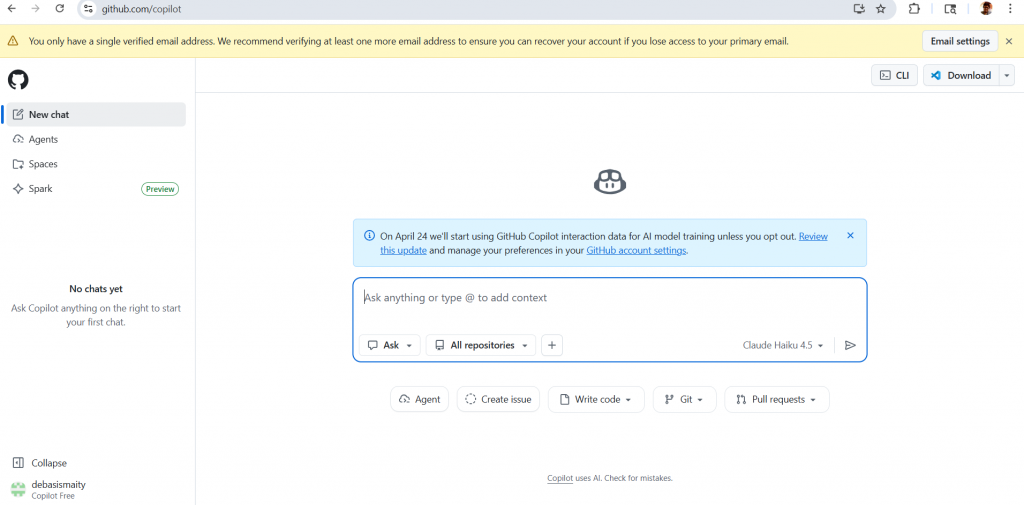
Step 2: Enable GitHub Copilot Free
- Go to github.com/settings/copilot
- Click “Start using Copilot for free” (no credit card needed for free tier)
- The free tier gives you: 2,000 code completions/month + 50 chat requests/month with Claude Sonnet or GPT-4o as the base model
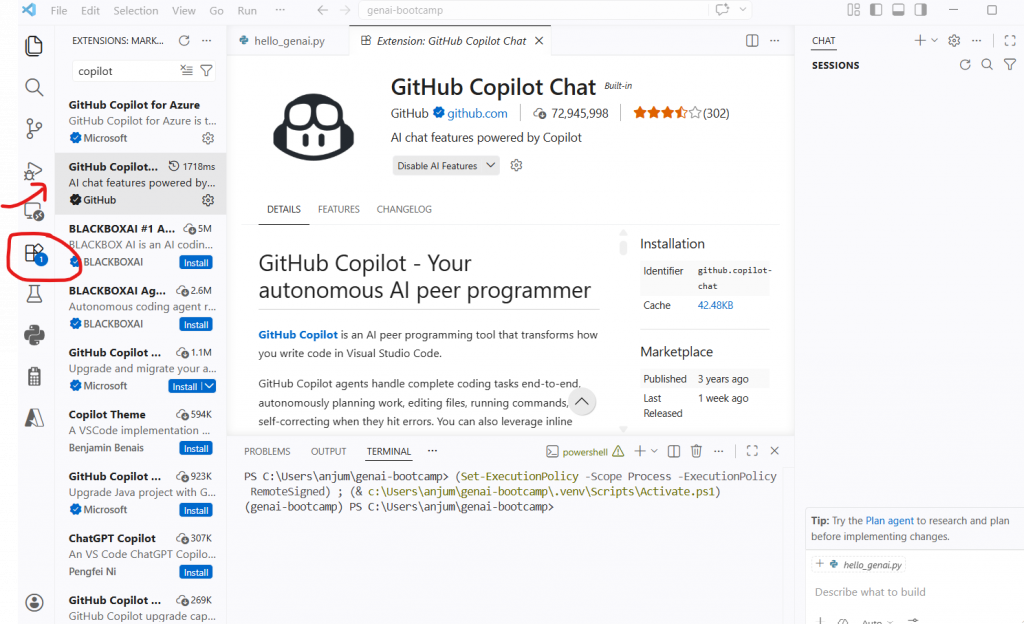
Step 3: Install GitHub Copilot Extension in VS Code
- Open VS Code
- Press
Ctrl+Shift+X(Windows/Linux) orCmd+Shift+X(Mac) to open Extensions - Search: GitHub Copilot
- Click Install on “GitHub Copilot” by GitHub (the first result)
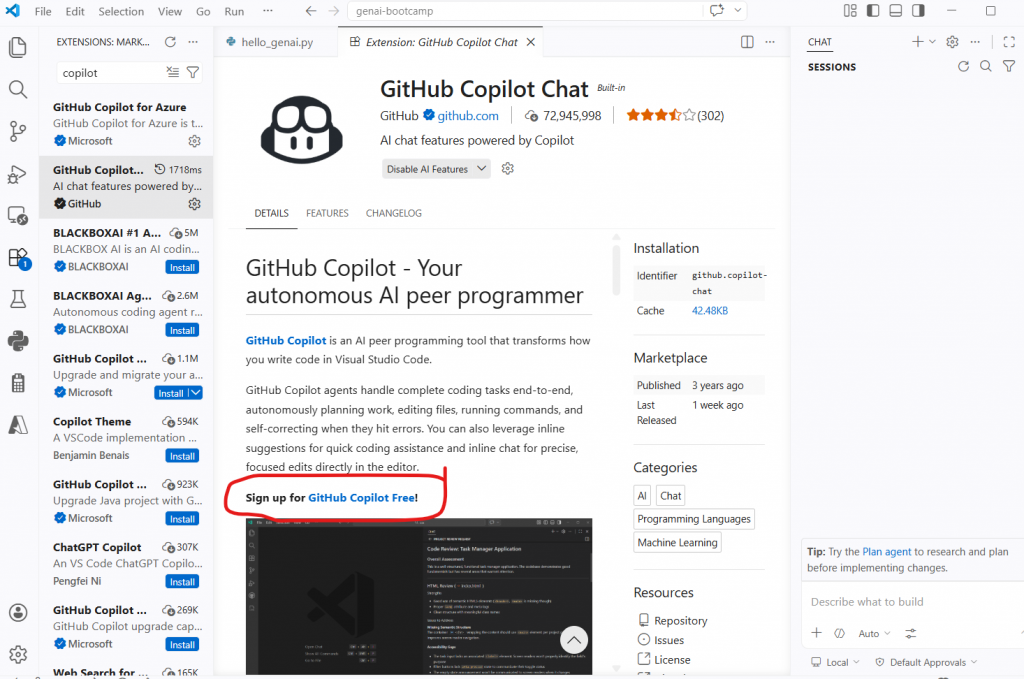
- Also install “GitHub Copilot Chat” — this adds the chat panel
Step 4: Sign In to GitHub from VS Code
- After installation, a notification appears: “Sign in to use GitHub Copilot” — click it
- Alternatively: Click the Accounts icon (person icon) at the bottom left of VS Code
- Click “Sign in with GitHub to use GitHub Copilot”
- Your browser opens — sign in with your GitHub account and authorize VS Code
- Return to VS Code — you’re connected
📸 Screenshot: VS Code sign-in prompt — click to authorize with GitHub account.
Step 5: Test GitHub Copilot is Working
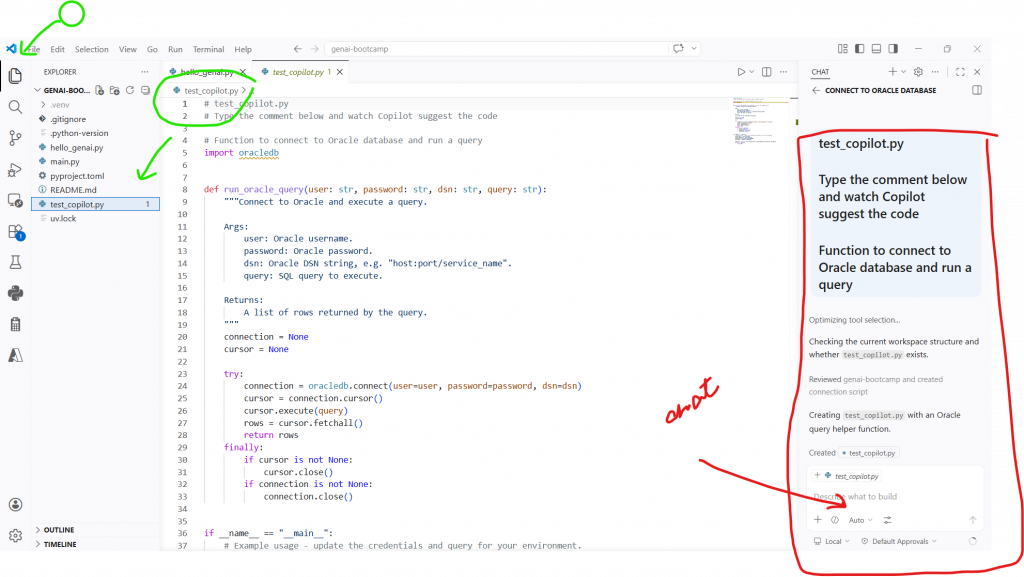
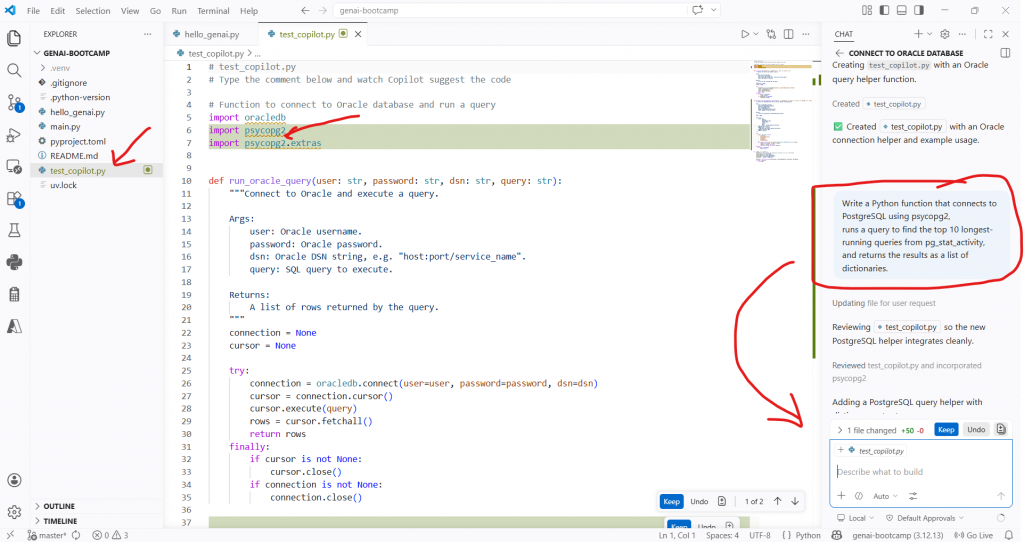
Open any Python file in your project (or create a new one: test_copilot.py) and start typing:
# test_copilot.py
# Type the comment below and watch Copilot suggest the code

# Function to connect to Oracle database and run a query
After typing the comment, pause for 1-2 seconds. Copilot will show a greyed-out code suggestion. Press Tab to accept it, or Esc to dismiss.
📸 Screenshot: VS Code showing Copilot’s inline suggestion (greyed text) — press Tab to accept.
Step 6: Use Copilot Chat
This is the most powerful feature. Open the chat panel:
- Press
Ctrl+Alt+I(Windows/Linux) orCmd+Option+I(Mac) - Or click the Copilot icon in the left sidebar
Try asking it something DBA-specific:
Write a Python function that connects to PostgreSQL using psycopg2,
runs a query to find the top 10 longest-running queries from pg_stat_activity,
and returns the results as a list of dictionaries.
Copilot will generate the complete function. This is exactly what Sunny demonstrated in class — “your thoughts work here, the AI writes the code.”
📸 Screenshot: Copilot Chat panel showing the generated PostgreSQL function.
💡 Copilot Keyboard Shortcuts (memorize these):
Tab — Accept full suggestionCtrl+→ — Accept next word onlyEsc — Dismiss suggestionAlt+] — See next suggestionAlt+[ — See previous suggestionCtrl+Alt+I — Open Copilot Chat
10. Complete UV Command Reference
Here is the complete UV command reference you’ll use throughout this bootcamp. Keep this as your quick-reference guide from previous blog.
Virtual Environment Management
# Create virtual environment — generic (uses pinned version)
uv venv

# Create with a specific name
uv venv myenv

# Create with a specific Python version (exact build string)
uv venv env --python cpython-3.12.18-windows-x86_64-none

# Generic version syntax
uv venv myenv --python 3.12

# Sync environment — creates/updates .venv to match pyproject.toml
# Run this after every git pull or when adding new packages
uv sync
Package Management
# Add a single package
uv add openai

# Add multiple packages at once
uv add openai python-dotenv langchain

# Add from a requirements.txt file
uv add -r requirements.txt

# Install using pip syntax (also works)
uv pip install openai
uv pip install -r requirements.txt

# Remove a package
uv remove numpy

# List all installed packages
uv pip list
Running Code
# Run a Python file (uses .venv automatically — no activation needed)
uv run hello_genai.py

# Run Python interactively
uv run python

# OR: Activate manually (classic method)
# Windows:
.venv\Scripts\activate
# macOS / Linux:
source .venv/bin/activate

# After activation, run normally
python hello_genai.py

# Deactivate
deactivate
Maintenance
# Clear UV cache (use when things get weird — package corruption etc.)
uv cache clean

# Update UV itself
uv self update
What to Commit to Git
# ✅ COMMIT these files:
pyproject.toml      # your dependency manifest
uv.lock             # exact pinned versions
.python-version     # Python version pin

# ❌ DO NOT COMMIT:
.venv/              # virtual environment (too large, OS-specific)
.env                # API keys (security risk)
__pycache__/        # Python compiled bytecode
11. Common Errors and Fixes
Error 1: VS Code not picking up UV environment
Symptom: Works with uv run file.py in terminal but fails when clicking the Play button in VS Code.
ModuleNotFoundError: No module named 'numpy'Cause: VS Code’s Play button uses the system Python, not your .venv. The Code Runner extension may also override the Python interpreter.
Fix:
# Step 1: Select the correct interpreter
# Press Ctrl+Shift+P → "Python: Select Interpreter"
# Choose: Python 3.12 ('.venv': venv) ./genai-bootcamp/.venv/...

# Step 2: If using Code Runner extension, configure it to use venv
# In VS Code Settings (Ctrl+,), search "code-runner.executorMap"
# Set python to: "${workspaceRoot}/.venv/Scripts/python" (Windows)
# or "${workspaceRoot}/.venv/bin/python" (Mac/Linux)

# Step 3 (simplest): Always use uv run instead of the Play button
uv run your_file.py
Error 2: GitHub Copilot shows “No completions available”
Cause: Not signed in, monthly free tier limit reached, or file type not supported.
Fix:
# Check sign-in: Click Accounts icon (bottom-left VS Code)
# Ensure GitHub account shown with "GitHub Copilot" listed

# Check usage: github.com/settings/copilot
# Shows remaining completions for current month

# If limit reached: upgrade to $10/month for unlimited
# OR use Claude Code / OpenAI Codex as alternative
Error 3: uv python list shows no Python versions
Symptom:
No Python versions foundFix:
# UV shows both installed and downloadable versions
# If empty, it means no internet connectivity to UV's Python registry

# Check connectivity (corporate proxy)
set UV_NATIVE_TLS=true   # Windows
export UV_NATIVE_TLS=true  # Mac/Linux

# Then retry
uv python list
uv python install 3.12
Error 4: uv sync fails with “No module named pip”
Fix:
# UV manages its own pip — reinstall pip inside the venv
uv run python -m ensurepip --upgrade
# Then retry
uv sync
12. Key Takeaways
✅ What you learned in this post:
- The full AI tree runs: ML (statistics) → DL (neural networks) → NLP → GenAI (Transformer-based) → Agentic AI. Each level builds on the one below.
- Deep Learning has 4 main branches: ANN, CNN, RNN, GAN. For GenAI, all roads lead to Transformers — RNNs and LSTMs are now obsolete.
- The Transformer (2017) won because it processes sequences in parallel with attention, unlike RNNs that process token-by-token and forget long context.
- DBAs and infra engineers take the Modern Route: skip classical ML/DL coding, start from Transformers, and learn the 13 key GenAI frameworks directly.
- The GenAI tools ecosystem has 12 categories — vector DBs, LLM frameworks, document parsing, guardrails, cloud platforms, evaluation, and more. You don’t learn all at once — each module covers one category.
- GitHub Copilot free tier is sufficient for all labs in this series. Set it up now and use it for every coding session going forward.
- Always use
uv run file.pyfor running Python files — it automatically uses your.venvwithout activation.
Test Your Knowledge
🧠 AI Roadmap and Tools Quiz
20 questions · Covers AI tree, DL branches, tools ecosystem · Free👉 Take the Quiz Now
References
- GitHub Copilot Features Documentation
- UV Official Documentation
- Attention Is All You Need — Original Transformer Paper (2017)
Part of the GenAI from Scratch series for DBAs and Infrastructure Engineers. Published every Friday at gradeupnow.in/genai-blog/