Introduction
Two questions come up constantly once a team decides to move PostgreSQL onto Kubernetes: “How do I actually get my existing data in?” and “Is this thing even secure?”
In Post 5, we saw why pg_basebackup — physical cloning — is explicitly discouraged for migrating an external PostgreSQL server into CloudNativePG. This post covers the method CloudNativePG actually recommends for that job: logical import, using pg_dump/pg_restore under the hood, wired directly into the initdb bootstrap process.
Then we turn to security — not as an afterthought, but as CloudNativePG designs it: layered, from your Go source code all the way out to your cloud infrastructure. This is the 4C Security Model, and understanding it will change how you think about every YAML file you write for the rest of this series.
What you’ll learn:
- Why logical import (not physical cloning) is the right tool for real PostgreSQL migrations
- The microservice import method — one database, clean and simple
- The monolith import method — multiple databases and roles in one shot
- CloudNativePG’s 4C Security Model: Code, Container, Cluster, Cloud
- How RBAC, service accounts, and the
cnpg-managerrole actually work - How to lock down cluster access using Kubernetes NetworkPolicies
- TLS certificates, password encryption, and storage-at-rest encryption
Prerequisites
Before you start, make sure you have:
- [ ] The Kind cluster
pgfrom Post 3 running, with CloudNativePG operator installed - [ ] The
cnpgkubectl plugin working - [ ] A source PostgreSQL instance to import from (we’ll create a throwaway one inside Kind for testing)
- [ ] Basic familiarity with Kubernetes RBAC concepts (Role, ClusterRole, RoleBinding)
Lab Environment
| Component | Version / Details |
|---|---|
| Kubernetes | Kind v0.27 (from Post 3) |
| CloudNativePG Operator | v1.28.1 |
| PostgreSQL | 16.x / 17.x |
| kubectl | v1.32+ |
| cnpg plugin | v1.25.0+ |
Part 1: Why Logical Import Instead of Physical Cloning
Quick recap from Post 5: pg_basebackup clones a running instance byte-for-byte over the streaming replication protocol. It requires matching architecture, matching major version, matching tablespaces, and a direct network path — a long list of conditions that rarely all hold true when your source is a legacy on-prem server.
Logical import works completely differently. It uses PostgreSQL’s own pg_dump and pg_restore — the same tools DBAs have used for decades to move data between servers, including across major version upgrades.
Physical clone (pg_basebackup)              Logical import (initdb.import)
─────────────────────────────              ──────────────────────────────
Byte-for-byte copy of PGDATA                Dumps objects as SQL/data, replays them
Same PostgreSQL major version required      Can upgrade major versions (e.g. 13 → 17)
Same architecture required                  Architecture-independent
Fast for large databases                    Slower — rebuilds indexes, etc.
Cannot exclude anything selectively         Choose specific databases/roles
Best for: same-cluster replicas, DR          Best for: real migrations, upgrades
Because it relies on PostgreSQL’s native MVCC and snapshot isolation,
pg_dumptakes a consistent backup over the network without blocking write activity on the source — right up until the final cutover. This is why CloudNativePG’s own documentation calls it the most flexible and reliable way to both migrate databases into Kubernetes and perform major version upgrades in one operation.
⚠️ Important: Stop writes on the source before your final import. Any transaction committed on the source after the dump snapshot started will not appear in the destination. This is why it’s sometimes called an “offline import.”
Part 2: How Import Works Under the Hood
Import isn’t a separate bootstrap method — it’s a subsection of initdb. You still bootstrap a brand-new cluster from scratch; you just tell it to pull data in as part of that process.
bootstrap:
  initdb:
    import:
      type: microservice | monolith
      databases: [...]
      roles: [...]        # monolith only
      source:
        externalCluster: <name>
CloudNativePG gives you two import strategies, and picking the right one depends on your target architecture:
| Microservice | Monolith | |
|---|---|---|
| Databases imported | Exactly 1 | 1 or more (or * wildcard) |
| Roles imported | None | Yes, explicitly listed |
| Best for | One app = one database (cloud-native pattern) | Legacy multi-tenant servers |
| Post-import SQL hook | ✅ postImportApplicationSQL | ❌ Not supported |
| Owner/user handling | Uses your initdb.owner | Preserves original owners exactly |
Part 3: Set Up a Source Database to Practice On
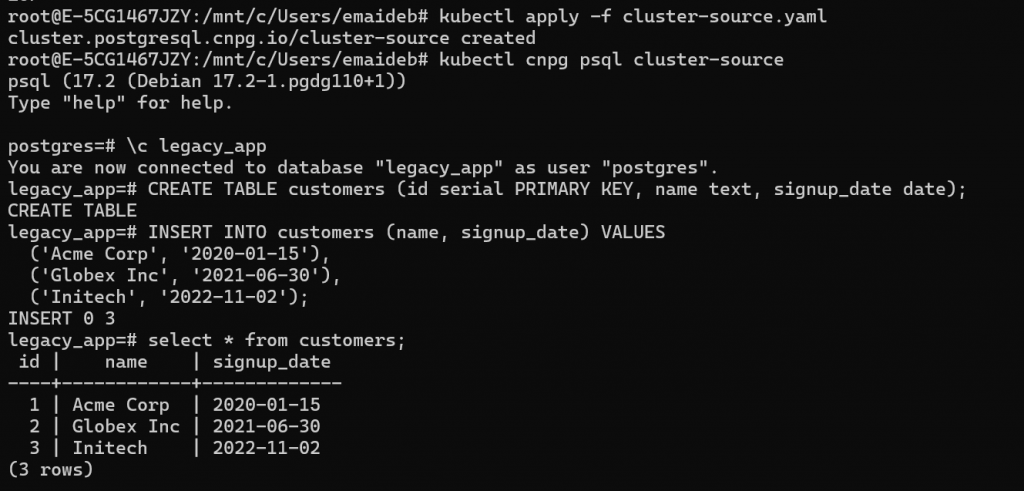
Since you likely don’t have a legacy PostgreSQL server sitting around, let’s create one inside Kind to practice the import against — this mirrors having “some old PostgreSQL instance somewhere” as your migration source.
cat <<EOF > cluster-source.yaml
apiVersion: postgresql.cnpg.io/v1
kind: Cluster
metadata:
  name: cluster-source
spec:
  instances: 1
  postgresql:
    pg_hba:
      - host all all all trust   # lab only — never do this in production!
  bootstrap:
    initdb:
      database: legacy_app
      owner: legacy_owner
  storage:
    size: 1Gi
EOF

kubectl apply -f cluster-source.yaml
Wait for it to be ready, then add some sample data:
kubectl cnpg psql cluster-source
\c legacy_app
CREATE TABLE customers (id serial PRIMARY KEY, name text, signup_date date);
INSERT INTO customers (name, signup_date) VALUES
  ('Acme Corp', '2020-01-15'),
  ('Globex Inc', '2021-06-30'),
  ('Initech', '2022-11-02');
GRANT ALL PRIVILEGES ON ALL TABLES IN SCHEMA public TO legacy_owner;
GRANT ALL PRIVILEGES ON ALL SEQUENCES IN SCHEMA public TO legacy_owner;
GRANT ALL PRIVILEGES ON ALL FUNCTIONS IN SCHEMA public TO legacy_owner;
GRANT USAGE, CREATE ON SCHEMA public TO legacy_owner;

-- Also set default privileges so any FUTURE objects created by postgres
-- automatically grant legacy_owner too
ALTER DEFAULT PRIVILEGES IN SCHEMA public GRANT ALL ON TABLES TO legacy_owner;
ALTER DEFAULT PRIVILEGES IN SCHEMA public GRANT ALL ON SEQUENCES TO legacy_owner;
ALTER TABLE customers OWNER TO legacy_owner;
ALTER SEQUENCE customers_id_seq OWNER TO legacy_owner;
\q
⚠️
trustauthentication is for this lab only. It allows any connection without a password. Never use this outside a disposable local test cluster.
Part 4: Microservice Import — One App, One Database
This is the recommended approach when your target architecture follows the one application, one database pattern — the cloud-native convention CloudNativePG itself is built around.
Step 4.1: Get the Source Superuser Credentials
We need to reference the source cluster’s connection info. Get its -rw service name and superuser secret:
root@E-5CG1467JZY:/mnt/c/Users/emaideb# kubectl get secret cluster-source-app -o jsonpath='{.data.password}' | base64 -d
echo
59lKNeDh2Dre9WZGuL3HHAKai6PpaGubknYB2llCE2jzmQ9cRtICllwc7wfCqxgD
Since we used trust auth for this lab, the password doesn’t strictly matter — but in a real migration, you’d copy the actual password here.
Step 4.2: Create the Microservice Import Manifest
apiVersion: postgresql.cnpg.io/v1
kind: Cluster
metadata:
  name: cluster-microservice
spec:
  instances: 3
  bootstrap:
    initdb:
      import:
        type: microservice
        databases:
          - legacy_app
        source:
          externalCluster: cluster-source
  storage:
    size: 1Gi
  externalClusters:
    - name: cluster-source
      connectionParameters:
        host: cluster-source-rw.default.svc
        user: legacy_owner
        dbname: legacy_app
      password:
        name: cluster-source-app
        key: password
Apply it:
kubectl apply -f cluster-microservice.yaml
Step 4.3: Watch the Import Happen
kubectl get pods -w
Behind the scenes, the operator runs a Kubernetes Job that performs these steps in order:
1. initdb bootstrap of the new cluster
2. pg_dump -Fd of legacy_app from cluster-source
3. pg_restore --no-acl --no-owner into the app database (owned by app user)
4. cleanup of the temporary dump file
5. (optional) run postImportApplicationSQL
6. ANALYZE VERBOSE on the imported database
kubectl get jobs
Expected output:
NAME                              COMPLETIONS   DURATION   AGE
cluster-microservice-import       1/1           12s        45s
[
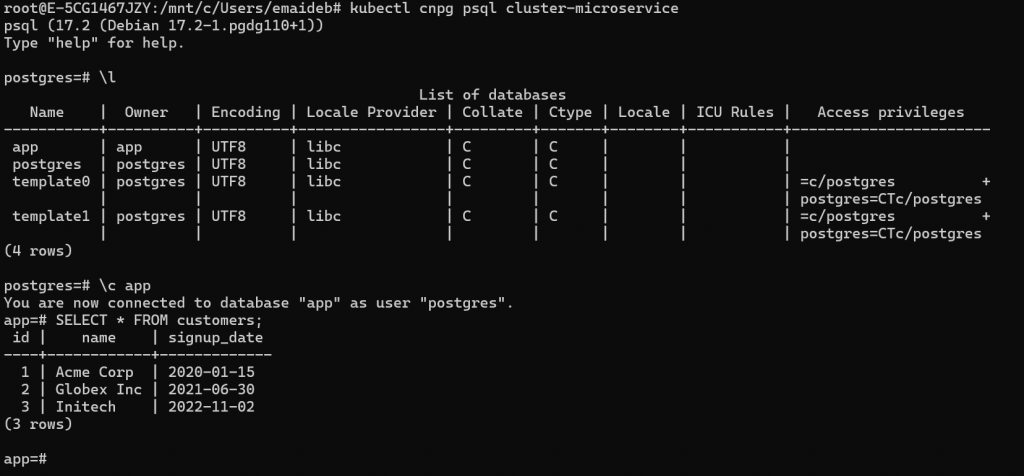
Step 4.4: Verify the Imported Data
kubectl cnpg status cluster-microservice
kubectl cnpg psql cluster-microservice
\l
-- Notice: the database is named "app" by default (convention), NOT "legacy_app"

\c app
SELECT * FROM customers;
--  id |    name    | signup_date
-- ----+------------+-------------
--   1 | Acme Corp  | 2020-01-15
--   2 | Globex Inc | 2021-06-30
--   3 | Initech    | 2022-11-02
Key behaviour: Notice the database was renamed to
app(the CloudNativePG convention) even though the source database was calledlegacy_app. If you want to keep the original name, setinitdb.database: legacy_appexplicitly in your manifest.
Step 4.5: Running Post-Import SQL
The microservice method supports a hook for running SQL right after the data lands — perfect for creating indexes that don’t need to exist during the restore, or setting up permissions:
spec:
  bootstrap:
    initdb:
      import:
        type: microservice
        databases:
          - legacy_app
        source:
          externalCluster: cluster-source
        postImportApplicationSQL:
          - CREATE INDEX idx_customers_signup ON customers(signup_date);
          - GRANT SELECT ON customers TO readonly_role;
Step 4.6: Microservice Constraints to Remember
| Constraint | Detail |
|---|---|
| Only one database | databases: array can only contain a single entry |
| No roles imported | Roles/users from the source are not brought over |
| Temp space required | pg_dump -Fd output is staged inside PGDATA temporarily, then auto-deleted |
| Network access required | The Kubernetes cluster must be able to reach the external source during the job |
| Source user needs sufficient privileges | Superuser is fine; otherwise needs enough grants to run pg_dump |
Part 5: Monolith Import — Multiple Databases and Roles
Real legacy servers rarely host just one database. The monolith approach handles multi-tenant servers where you need several databases and their owning roles preserved exactly.
Step 5.1: Add a Second Database and Role to the Source
kubectl cnpg psql cluster-source
CREATE ROLE billing_owner LOGIN;
CREATE DATABASE billing OWNER billing_owner;
\c billing
CREATE TABLE invoices (id serial PRIMARY KEY, amount numeric, customer text);
INSERT INTO invoices (amount, customer) VALUES (499.00, 'Acme Corp');
\q
Step 5.2: Create the Monolith Import Manifest
apiVersion: postgresql.cnpg.io/v1
kind: Cluster
metadata:
  name: cluster-monolith
spec:
  instances: 3
  bootstrap:
    initdb:
      import:
        type: monolith
        databases:
          - legacy_app
          - billing
        roles:
          - legacy_owner
          - billing_owner
        source:
          externalCluster: cluster-source
  storage:
    size: 1Gi
  externalClusters:
    - name: cluster-source
      connectionParameters:
        host: cluster-source-rw.default.svc
        user: postgres
        dbname: postgres
      password:
        name: cluster-source-superuser
        key: password
kubectl apply -f cluster-monolith.yaml
Step 5.3: Verify Both Databases and Their Original Owners
kubectl cnpg psql cluster-monolith
\l
--                              List of databases
--    Name     |     Owner      | Encoding
-- -------------+---------------+----------
--  legacy_app  | legacy_owner  | UTF8
--  billing     | billing_owner | UTF8
--  postgres    | postgres      | UTF8

\c billing
SELECT * FROM invoices;

\du
-- Notice: legacy_owner and billing_owner both exist as roles now
Key difference from microservice: database names and owner roles are preserved exactly as they existed on the source — no renaming to
app.
Step 5.4: The Wildcard Shortcut
If you want to import everything from the source without listing each database and role individually:
spec:
  bootstrap:
    initdb:
      import:
        type: monolith
        databases:
          - "*"
        roles:
          - "*"
        source:
          externalCluster: cluster-source
The wildcard automatically skips the
postgresdatabase, template databases, and any database not accepting connections.
Step 5.5: Monolith Constraints to Remember
| Constraint | Detail |
|---|---|
| At least one database required | databases: array cannot be empty |
| Roles must be listed explicitly | Unless imported databases need no custom roles |
| Reserved roles never imported | postgres, streaming_replica, cnp_pooler_pgbouncer are always skipped |
SUPERUSER stripped | Any imported role loses superuser privilege, even if it had it on the source |
No postImportApplicationSQL | This hook is microservice-only |
Part 6: The 4C Security Model
Now let’s shift gears entirely. CloudNativePG’s security design follows a framework the EDB training material calls the 4C Security Model — four concentric layers, each addressing a different attack surface.
┌─────────────────────────────────────────────────────────┐
│  CLOUD                                                    │
│  Infrastructure security, IAM, compliance controls        │
│  ┌───────────────────────────────────────────────────┐   │
│  │  CLUSTER                                            │   │
│  │  API security, RBAC, network policies               │   │
│  │  ┌───────────────────────────────────────────┐     │   │
│  │  │  CONTAINER                                  │     │   │
│  │  │  Image scanning, least privilege, runtime    │     │   │
│  │  │  ┌───────────────────────────────────┐      │     │   │
│  │  │  │  CODE                               │      │     │   │
│  │  │  │  Secure coding, vuln scanning,      │      │     │   │
│  │  │  │  DevSecOps                          │      │     │   │
│  │  │  └───────────────────────────────────┘      │     │   │
│  │  └───────────────────────────────────────────┘     │   │
│  └───────────────────────────────────────────────────┘   │
└─────────────────────────────────────────────────────────┘
| Layer | Scope | What it covers |
|---|---|---|
| Code (innermost) | Application source | Code reviews, static analysis, secure development lifecycle |
| Container | Images | Minimal trusted base images, vulnerability scanning, least-privilege runtime |
| Cluster | Kubernetes | API server security, RBAC, network policies, namespace isolation |
| Cloud (outermost) | Infrastructure | IAM, hardware/network security, compliance controls |
How This Applies in Practice — Code and Container Layers
You don’t manage the Code or Container layers directly — CloudNativePG’s maintainers do — but it’s worth knowing what happens on your behalf:
Code security — the operator’s CI/CD pipeline runs multiple static analysis tools on every change:
- gosec (Golang Security Checker) — scans the abstract syntax tree of the Go source
- govulncheck — identifies known vulnerabilities in Go code and the compiler
- CodeQL (GitHub Security Scanning) — deep static analysis
- Snyk — nightly scans with weekly vulnerability reports
Container security — every PostgreSQL operand image is rebuilt daily to pick up the latest OS security patches, and scanned with tools like Dockle and Snyk before release.
The practical upshot: pin your images to a recent tag and let your CI/CD pipeline pull updates regularly. You’re inheriting a security posture that’s actively maintained upstream — but only if you stay current.
Part 7: Cluster Security — RBAC in Depth
This is the layer you directly configure and are responsible for. Let’s go hands-on.
Step 7.1: Inspect the Operator’s Own RBAC
The operator interacts with the Kubernetes API through a dedicated service account called cnpg-manager, bound to a ClusterRole of the same name:
kubectl describe clusterrole cnpg-manager | head -30
You’ll see a long list of resource permissions — pods, services, secrets, PVCs, and more — scoped tightly to what the operator actually needs to function.
kubectl get clusterrole | grep cnpg
Expected output:
cnpg-database-editor-role
cnpg-database-viewer-role
cnpg-manager
cnpg-publication-editor-role
cnpg-publication-viewer-role
cnpg-subscription-editor-role
cnpg-subscription-viewer-role
Notice there are editor and viewer roles for user-facing resources like Database, Publication, and Subscription — these are meant to be bound to your own team members or CI/CD service accounts, giving fine-grained access without full cluster-admin rights.
root@E-5CG1467JZY:/mnt/c/Users/emaideb# kubectl describe clusterrole cnpg-manager | head -30
Name: cnpg-manager
Labels:
Annotations:
PolicyRule:
Resources Non-Resource URLs Resource Names Verbs
——— —————– ————– —–
configmaps [] [] [create delete get list patch update watch]
secrets [] [] [create delete get list patch update watch]
services [] [] [create delete get list patch update watch]
deployments.apps [] [] [create delete get list patch update watch]
poddisruptionbudgets.policy [] [] [create delete get list patch update watch]
backups.postgresql.cnpg.io [] [] [create delete get list patch update watch]
clusters.postgresql.cnpg.io [] [] [create delete get list patch update watch]
databases.postgresql.cnpg.io [] [] [create delete get list patch update watch]
poolers.postgresql.cnpg.io [] [] [create delete get list patch update watch]
publications.postgresql.cnpg.io [] [] [create delete get list patch update watch]
scheduledbackups.postgresql.cnpg.io [] [] [create delete get list patch update watch]
subscriptions.postgresql.cnpg.io [] [] [create delete get list patch update watch]
persistentvolumeclaims [] [] [create delete get list patch watch]
pods/exec [] [] [create delete get list patch watch]
pods [] [] [create delete get list patch watch]
jobs.batch [] [] [create delete get list patch watch]
podmonitors.monitoring.coreos.com [] [] [create delete get list patch watch]
serviceaccounts [] [] [create get list patch update watch]
rolebindings.rbac.authorization.k8s.io [] [] [create get list patch update watch]
roles.rbac.authorization.k8s.io [] [] [create get list patch update watch]
volumesnapshots.snapshot.storage.k8s.io [] [] [create get list patch watch]
leases.coordination.k8s.io [] [] [create get update]
events [] [] [create patch]
nodes [] [] [get list watch]
root@E-5CG1467JZY:/mnt/c/Users/emaideb# kubectl get clusterrole | grep cnpg
cnpg-database-editor-role 2026-07-15T17:40:35Z
cnpg-database-viewer-role 2026-07-15T17:40:35Z
cnpg-manager 2026-07-15T17:40:35Z
cnpg-publication-editor-role 2026-07-15T17:40:35Z
cnpg-publication-viewer-role 2026-07-15T17:40:35Z
cnpg-subscription-editor-role 2026-07-15T17:40:35Z
cnpg-subscription-viewer-role 2026-07-15T17:40:35Z
root@E-5CG1467JZY:/mnt/c/Users/emaideb#
Step 7.2: What the Operator Actually Manages
CloudNativePG creates and manages a specific, bounded set of Kubernetes resources on your behalf:
| Resource Type | What CloudNativePG does with it |
|---|---|
| ConfigMaps | Default Prometheus exporter monitoring metrics |
| Deployments | Manages the PgBouncer connection pooler |
| Jobs | Handles lifecycle phases — bootstrap, import (as we just saw), backups |
| PVCs | Dynamically provisions storage for PGDATA |
| Pods | Manages primary and replica instances |
| Secrets | Self-provisions random passwords and TLS certificates |
| ServiceAccounts | One per instance manager, for safe API interaction |
| Services | Controls network access, manages failover/switchover routing |
| ValidatingWebhookConfigurations / MutatingWebhookConfigurations | Injects self-signed CA for validating your YAML on the fly |
| VolumeSnapshots | Creates and validates snapshots for backup/restore |
| Nodes | Read-only — used for affinity/anti-affinity scheduling across AZs |
Important boundary: As a user, you should only directly interact with
Cluster,Pooler,Backup,ScheduledBackup,Database,Publication,Subscription,ImageCatalog, andClusterImageCatalogresources. Everything else in the table above is operator-managed — editing it directly will just get overwritten on the next reconciliation.
Step 7.3: Instance-Level Service Accounts
Each PostgreSQL instance also gets its own dedicated Role and RoleBinding — scoped only to the Secrets that specific cluster needs:
kubectl get role
Expected output:
NAME               CREATED AT
cluster-example    2026-07-20T10:15:00Z
cluster-microservice  2026-07-20T11:30:00Z
kubectl get role cluster-microservice -o yaml
You’ll see resourceNames scoped tightly:
resourceNames:
  - cluster-microservice-app
  - cluster-microservice-ca
  - cluster-microservice-replication
  - cluster-microservice-server
  - cluster-microservice-superuser
This means the pod running cluster-microservice can only read its own five secrets — not any other cluster’s credentials, even within the same namespace.
Part 8: Network Policies — Restricting Cluster Access
By default, any pod in your Kubernetes cluster that knows the service name can attempt to connect to your PostgreSQL cluster. NetworkPolicy resources let you lock this down to specific namespaces or pods.
Step 8.1: Create an Isolated Namespace and Cluster
kubectl create namespace appdb-namespace

cat <<EOF > appdb.yaml
apiVersion: postgresql.cnpg.io/v1
kind: Cluster
metadata:
  name: appdb
  namespace: appdb-namespace
spec:
  instances: 3
  storage:
    size: 1Gi
EOF

kubectl apply -f appdb.yaml
Step 8.2: Restrict Ingress to the Same Namespace Only
apiVersion: networking.k8s.io/v1
kind: NetworkPolicy
metadata:
  name: pg-app-only
  namespace: appdb-namespace
spec:
  podSelector:
    matchLabels:
      cnpg.io/cluster: appdb
  policyTypes:
    - Ingress
  ingress:
    - from:
        - namespaceSelector:
            matchLabels:
              kubernetes.io/metadata.name: appdb-namespace
      ports:
        - protocol: TCP
          port: 5432
kubectl apply -f appdb-network-policy.yaml
This policy allows connections to appdb only from pods inside appdb-namespace — everything else is blocked on port 5432.
Step 8.3: Test the Policy with Two Pods
Deploy a test pod inside the allowed namespace, and one outside it:
kubectl run test-pod1 --image=postgres:latest \
  -n appdb-namespace -- sleep infinity

kubectl run test-pod2 --image=postgres:latest \
  -n default -- sleep infinity
From inside the allowed namespace (should connect):
kubectl exec -it test-pod1 -n appdb-namespace -- \
  psql "postgresql://app:PASSWORD@appdb-rw.appdb-namespace:5432/app"
Expected: connects successfully.
From outside the allowed namespace (should be blocked):
kubectl exec -it test-pod2 -n default -- \
  psql "postgresql://app:PASSWORD@appdb-rw.appdb-namespace:5432/app"
Expected output:
psql: error: connection to server at "appdb-rw.appdb-namespace" (10.96.34.244), port 5432
failed: Connection timed out
[SCREENSHOT: Terminal showing test-pod1 connecting successfully and test-pod2 timing out] 📸 Screenshot: NetworkPolicy working — same-namespace connects, cross-namespace blocked
Part 9: Default Exposed Ports
Know what’s listening where before you write NetworkPolicies for real workloads:
| Component | Port | Purpose | TLS | Auth Required |
|---|---|---|---|---|
| Operator | 9443 | Webhook server | Yes | Yes |
| Operator | 8080 | Prometheus metrics | No | No |
| Instance manager | 9187 | Metrics (optional) | Optional | No |
| Instance manager | 8000 | Status endpoint | Yes | No |
| Operand (Postgres) | 5432 | PostgreSQL connections | Optional | Yes |
Note that the operator’s own metrics port (8080) has no TLS by default. If you’re exposing metrics outside the cluster, put a NetworkPolicy or service mesh in front of it, or enable TLS via
METRICS_CERT_DIRas we covered in Post 4’s operator configuration section.
Part 10: PostgreSQL Authentication and Password Security
Step 10.1: Password Management Defaults
CloudNativePG handles credentials for you automatically:
- Auto-generated passwords for both superuser and application user, stored in Kubernetes Secrets with
.pgpass-compatible format - SCRAM-SHA-256 is the default encryption method on PostgreSQL 14+ (MD5 on older versions)
- The superuser password is only created if
enableSuperuserAccess: trueis set — by default, superuser login is disabled entirely for security
spec:
  enableSuperuserAccess: true   # off by default — enable deliberately
Best practice: Leave
enableSuperuserAccessdisabled unless you have a specific operational need. The operator itself doesn’t need superuser access to reconcile the cluster for day-to-day operations — it primarily needs it during bootstrap and certain maintenance tasks.
Step 10.2: TLS for Replication Traffic
Node-to-node replication connections are secured with TLS by default, using certificate-based authentication for the streaming_replica user:
kubectl exec -it cluster-example-1 -- \
  cat /controller/certificates/server.crt | openssl x509 -noout -dates
Recall from Post 4’s fixed parameters list:
ssl = 'on'
ssl_ca_file = '/controller/certificates/client-ca.crt'
ssl_cert_file = '/controller/certificates/server.crt'
ssl_key_file = '/controller/certificates/server.key'
ssl_max_protocol_version = 'TLSv1.3'
ssl_min_protocol_version = 'TLSv1.3'
TLS 1.3 is enforced as both the minimum and maximum protocol version — CloudNativePG doesn’t allow negotiating down to older, weaker TLS versions.
Step 10.3: Storage Encryption at Rest
CloudNativePG doesn’t implement disk encryption itself — it delegates to your Kubernetes StorageClass. On AWS EKS, this means using an EBS-backed StorageClass with encryption enabled:
apiVersion: storage.k8s.io/v1
kind: StorageClass
metadata:
  name: encrypted-ebs
provisioner: ebs.csi.aws.com
parameters:
  encrypted: "true"
  type: gp3
volumeBindingMode: WaitForFirstConsumer
Then reference it in your Cluster:
apiVersion: postgresql.cnpg.io/v1
kind: Cluster
metadata:
  name: pg-cluster
spec:
  instances: 3
  storage:
    size: 10Gi
    storageClass: encrypted-ebs
On Kind (local lab): encryption-at-rest doesn’t apply the same way since you’re using
local-path-provisioneron your laptop’s disk. This is strictly a production/cloud consideration — but it’s important to configure correctly before going live on AWS EKS.
Common Errors and Fixes
Error 1: Import job fails with “connection refused”
Symptom:
kubectl logs job/cluster-microservice-import
pg_dump: error: connection to server at "cluster-source-rw.default.svc", port 5432 failed: Connection refused
Cause: The source cluster isn’t reachable — wrong service name, wrong namespace, or the source cluster isn’t ready yet.
Fix:
# Verify the source cluster is healthy first
kubectl cnpg status cluster-source

# Confirm the exact service name
kubectl get svc | grep cluster-source

# Double check the host in your externalClusters connectionParameters matches exactly
Error 2: Monolith import fails — “role does not exist”
Symptom:
ERROR: role "billing_owner" does not exist
Cause: You listed a database owned by a role that you forgot to include in the roles: array.
Fix: Make sure every role that owns an imported database (or objects within it) is explicitly listed:
import:
  type: monolith
  databases:
    - billing
  roles:
    - billing_owner   # must be included or ownership grants will fail
Error 3: NetworkPolicy blocks traffic you actually want
Symptom: Application pods in a different namespace than the cluster can no longer connect after applying a NetworkPolicy.
Cause: Your namespaceSelector only allowed the same namespace as the database.
Fix: Add an explicit namespaceSelector entry for each namespace that legitimately needs access:
ingress:
  - from:
      - namespaceSelector:
          matchLabels:
            kubernetes.io/metadata.name: appdb-namespace
      - namespaceSelector:
          matchLabels:
            kubernetes.io/metadata.name: app-frontend-namespace   # added
    ports:
      - protocol: TCP
        port: 5432
Key Takeaways
✅ Logical import (initdb.import), not pg_basebackup, is the CloudNativePG-recommended way to migrate real external PostgreSQL databases — it works across major versions and doesn’t require matching architecture.
✅ Use microservice import for the one-app-one-database cloud-native pattern; use monolith import for legacy multi-tenant servers where you need to preserve multiple databases and their original owning roles.
✅ CloudNativePG’s security is layered into the 4C Model: Code and Container are maintained upstream by the project (daily image rebuilds, multiple static analysis tools); Cluster (RBAC, NetworkPolicies) and Cloud (IAM, storage encryption) are your responsibility to configure.
✅ Every PostgreSQL instance gets its own scoped Role/RoleBinding — a compromised pod can only read that specific cluster’s own secrets, not every cluster’s credentials in the namespace.
✅ NetworkPolicy resources are the primary tool for restricting which namespaces/pods can reach your PostgreSQL cluster on port 5432 — test both the allowed and blocked paths before trusting a policy in production.
Test Your Knowledge
Ready to test what you’ve learned? Take the free quiz:
👉 PostgreSQL Migration & Security Quiz → gradeupnow.in/postgres-oracle-migration-quiz/
20 questions · Instant feedback · Detailed explanations · Free
What’s Next
This post is part of the PostgreSQL on Kubernetes (CloudNativePG) series:
| # | Post | Status |
|---|---|---|
| 1 | CloudNativePG Architecture on AWS EKS | ✅ Published |
| 2 | Installing CloudNativePG on AWS EKS — Step by Step | ✅ Published |
| 3 | PostgreSQL on Kind in WSL Ubuntu with Grafana Monitoring | ✅ Published |
| 4 | PostgreSQL Configuration & Pod Tuning on Kubernetes | ✅ Published |
| 5 | Bootstrap Methods — initdb, Recovery, pg_basebackup | ✅ Published |
| 6 | Importing Databases & Security on CloudNativePG | 📍 You are here |
| 7 | Replication & Rolling Updates on Kubernetes | ⬜ Coming next week |
In Post 7, we go deep into replication internals — synchronous vs. asynchronous streaming, replication slots, anti-affinity rules for true multi-AZ resilience, and how rolling updates avoid unnecessary downtime during operator upgrades.
👉 [Next Post: Replication & Rolling Updates on Kubernetes → coming next week]
References
- EDB CloudNativePG Documentation — Importing Postgres Databases
- EDB CloudNativePG Documentation — Security
- PostgreSQL pg_dump Documentation
- PostgreSQL pg_restore Documentation
- Kubernetes NetworkPolicy Documentation
- Kubernetes RBAC Documentation
- EDB Essentials for CloudNativePG — Student Guide (Security, Monitoring, and Logging module)
Found this helpful? Share it with your DBA team! Questions? Drop them in the comments below.
Screenshot guide: 7 screenshot placeholders in this post. The most valuable for readers: the monolith
\loutput showing preserved database owners (Step 5.3), the instance-level RBAC scoping (Step 7.3), and the NetworkPolicy test showing one pod connecting and one timing out (Step 8.3) — that last one is the clearest possible demonstration that the policy actually works.